本文学习于github项目learn-claude-code
什么不是agent
人们总是想当然的以为agent就是简单的提示词注入,然而实际不然。当通过过多的提示词来对AI进行限制时,AI便失去了其发散性,失去了泛化能力。
什么是agent的开发
现代意义的agent的开发往往有两个意思
- 训练模型
通过强化学习、微调、RLHF 或其他基于梯度的方法调整权重。收集任务过程数据 — 真实领域中感知、推理、行动的实际序列 — 用它们来塑造模型的行为。这是 DeepMind、OpenAI、腾讯 AI Lab、Anthropic 在做的事。这是最本义的 Agent 开发。
- 构建 Harness
通过代码来编写一个可以提供给AI操控的环境架构。这个是本文需要学习的内容
Harness的结构
1
2
3
4
5
6
| Harness = Tools + Knowledge + Observation + Action Interfaces + Permissions
Tools 工具,提供给AI调用的工具,如shell,文件读取功能,网络搜索,浏览器,数据库
Knowlege 提供给Ai的知识库,上下API规范,产品文档,领域资料,风格等
Observation 错误日志,git diff
Action: 其实就是前端,如何于用户进行交互
Permissions: 权限,限制沙箱
|
开始学习
这个项目共有12个harness。每个harness都在前一个循环上加一个harness机制
Claude API 返回的整体结构
不同AI返回的json格式不太相同。学习之前先了解邮箱claude返回的json内容结构。这样更容易看懂
1
2
3
4
5
6
7
8
9
10
11
12
| {
"id": "msg_xxx",
"type": "message",
"role": "assistant",
"content": [...],
"model": "...",
"stop_reason": "end_turn / tool_use / max_tokens / ...",
"usage": {
"input_tokens": 123,
"output_tokens": 456
}
}
|
重点字段content
这个字段是AI返回的内容一般有如下几种格式
普通文本回复
1
2
3
4
5
6
7
8
| {
"content": [
{
"type": "text",
"text": "当前目录有 file1 和 file2"
}
]
}
|
调用工具
1
2
3
4
5
6
7
8
9
10
11
12
| {
"content": [
{
"type": "tool_use",
"id": "toolu_123",
"name": "bash",
"input": {
"command": "ls"
}
}
]
}
|
混合
1
2
3
4
5
6
7
8
9
10
11
| {
"content": [
{"type": "text", "text": "我先查看目录"},
{
"type": "tool_use",
"id": "toolu_123",
"name": "bash",
"input": {"command": "ls"}
}
]
}
|
重点字段 stop_reason
1
| "stop_reason": "tool_use"
|
其一般有如下几个值
1
2
3
4
| end_turn 正常结束(回答完了)
tool_use 要调用工具
max_tokens 被截断
stop_sequence 命中停止词
|
usage(token统计)
1
2
3
4
| "usage": {
"input_tokens": 120,
"output_tokens": 300
}
|
表示输入输出的token量
role
表示这个为模型输出
核心循环
最核心的循环代码
1
2
3
4
5
6
7
8
9
10
11
12
13
14
15
16
17
18
19
20
21
22
| def agent_loop(messages):
while True:
response = client.messages.create(
model=MODEL, system=SYSTEM,
messages=messages, tools=TOOLS,
)
messages.append({"role": "assistant",
"content": response.content})
if response.stop_reason != "tool_use":
return
results = []
for block in response.content:
if block.type == "tool_use":
output = TOOL_HANDLERS[block.name](**block.input)
results.append({
"type": "tool_result",
"tool_use_id": block.id,
"content": output,
})
messages.append({"role": "user", "content": results})
|
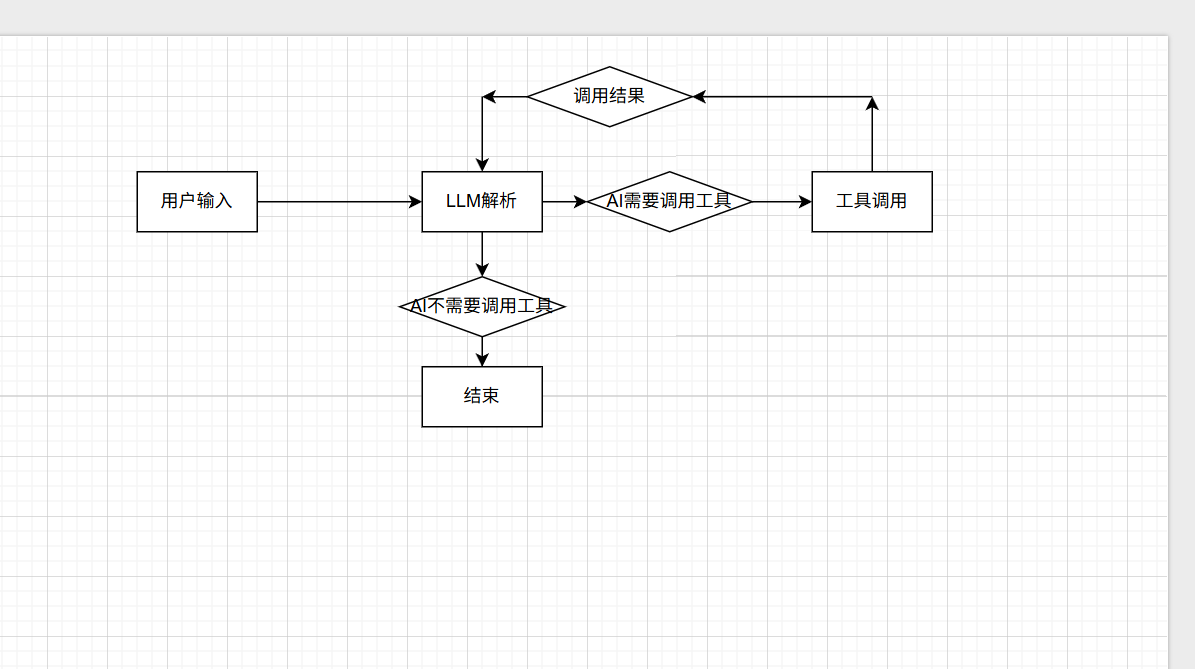
从代码可以看出来其就是不断的循环与AI进行对话,将AI返回的结果当做assistant的信息写如message,如果返回内容有调用工具就调用后将结果再次传入messages,其传入的role为user这主要是因为只有权限为user时大模型才会进行解析并回复。所有要将工具的执行结构给AI解析从而判断下一步是结束还是继续调用工具。不断循环直到stop_reason!=”tools_use”即不AI不需要使用工具时跳出循环。
s01 “One loop & Bash is all you need” — 一个工具 + 一个循环 = 一个智能体
1
2
3
4
5
6
7
8
9
10
11
12
13
14
15
16
17
18
19
20
21
22
23
24
25
26
27
28
29
30
31
32
33
34
35
36
37
38
39
40
41
42
43
44
45
46
47
48
49
50
51
52
53
54
55
56
57
58
59
60
61
62
63
64
65
66
67
68
69
70
71
72
73
74
75
76
77
78
79
80
81
82
83
84
85
86
87
88
89
|
"""
s01_agent_loop.py - The Agent Loop
The entire secret of an AI coding agent in one pattern:
while stop_reason == "tool_use":
response = LLM(messages, tools)
execute tools
append results
+----------+ +-------+ +---------+
| User | ---> | LLM | ---> | Tool |
| prompt | | | | execute |
+----------+ +---+---+ +----+----+
^ |
| tool_result |
+---------------+
(loop continues)
This is the core loop: feed tool results back to the model
until the model decides to stop. Production agents layer
policy, hooks, and lifecycle controls on top.
"""
import os
import subprocess
from anthropic import Anthropic
from dotenv import load_dotenv
load_dotenv(override=True)
if os.getenv("ANTHROPIC_BASE_URL"):
os.environ.pop("ANTHROPIC_AUTH_TOKEN", None)
client = Anthropic(base_url=os.getenv("ANTHROPIC_BASE_URL"))
MODEL = os.environ["MODEL_ID"]
SYSTEM = f"You are a coding agent at {os.getcwd()}. Use bash to solve tasks. Act, don't explain."
TOOLS = [{
"name": "bash",
"description": "Run a shell command.",
"input_schema": {
"type": "object",
"properties": {"command": {"type": "string"}},
"required": ["command"],
},
}]
def run_bash(command: str) -> str:
dangerous = ["rm -rf /", "sudo", "shutdown", "reboot", "> /dev/"]
if any(d in command for d in dangerous):
return "Error: Dangerous command blocked"
try:
r = subprocess.run(command, shell=True, cwd=os.getcwd(),
capture_output=True, text=True, timeout=120)
out = (r.stdout + r.stderr).strip()
return out[:50000] if out else "(no output)"
except subprocess.TimeoutExpired:
return "Error: Timeout (120s)"
def agent_loop(messages: list):
while True:
response = client.messages.create(
model=MODEL, system=SYSTEM, messages=messages,
tools=TOOLS, max_tokens=8000,
)
messages.append({"role": "assistant", "content": response.content})
if response.stop_reason != "tool_use":
return
results = []
for block in response.content:
if block.type == "tool_use":
print(f"\033[33m$ {block.input['command']}\033[0m")
output = run_bash(block.input["command"])
print(output[:200])
results.append({"type": "tool_result", "tool_use_id": block.id,
"content": output})
messages.append({"role": "user", "content": results})
if __name__ == "__main__":
history = []
while True:
try:
query = input("\033[36ms01 >> \033[0m")
except (EOFError, KeyboardInterrupt):
break
if query.strip().lower() in ("q", "exit", ""):
break
history.append({"role": "user", "content": query})
agent_loop(history)
response_content = history[-1]["content"]
if isinstance(response_content, list):
for block in response_content:
if hasattr(block, "text"):
print(block.text)
print()
|
来一个个解释S01_agent_loop的源码吧
client.messages.create其实就是于AI进行对话。
client.messages.create参数解释
model
其中参数model模型参数
system
system参数就是提示词
messages
messages=messages其中meassage其实就是对话记录
其中role分别有user,assistant,system这三种权限。user就是输入给模型的信息模型会对这个做出应答。assistant表示模型的输出。而system就是输入的提示词,这里其实就是代码中的SYSTEM=xxxx
本质就是给模型定义工具规范(Tool Schema)其实就是工具描述
1
2
3
4
5
6
7
8
9
| TOOLS = [{
"name": "bash",
"description": "Run a shell command.",
"input_schema": {
"type": "object",
"properties": {"command": {"type": "string"}},
"required": ["command"],
},
}]
|
description其实就是工具的提示词主要让AI知道这个是什么工具
name 就是工具名称
input_schema就是工具参数输入的格式。
1
2
3
4
| "type": "object" 工具输入类型必须是一个对象
"properties": {"command": {"type": "string"}} 工具所需要的参数名称和类型
"required": ["command"] 必须要有的参数
|
流程总结
上面描述的只要能看懂那么我们就能很轻松的了解这第一个agent的代码了。
其流程其实就是一个工具一个循环,流程图如下
s02 “加一个工具, 只加一个 handler” — 循环不用动, 新工具注册进 dispatch map 就行
s03 “没有计划的 agent 走哪算哪” — 先列步骤再动手, 完成率翻倍
s04 “大任务拆小, 每个小任务干净的上下文” — 子智能体用独立 messages[], 不污染主对话
s06 “上下文总会满, 要有办法腾地方” — 三层压缩策略, 换来无限会话
s07 “大目标要拆成小任务, 排好序, 记在磁盘上” — 文件持久化的任务图, 为多 agent 协作打基础
s08 “慢操作丢后台, agent 继续想下一步” — 后台线程跑命令, 完成后注入通知
s09 “任务太大一个人干不完, 要能分给队友” — 持久化队友 + 异步邮箱
s10 “队友之间要有统一的沟通规矩” — 一个 request-response 模式驱动所有协商
s11 “队友自己看看板, 有活就认领” — 不需要领导逐个分配, 自组织
s12 “各干各的目录, 互不干扰” — 任务管目标, worktree 管目录, 按 ID 绑定